Dan Cohen

Archive for the ‘Tools’ Category

New Horizons Keynote

Wednesday, May 14th, 2008

New Horizons LogoFor readers of this blog within easy travel distance of Charlottesville, Virginia, I’ll be giving the keynote address on May 19 at the second annual New Horizons conference at the University of Virginia, showcasing technology in teaching, research, and scholarship. My talk is entitled “Creating Scholarly Tools and Resources for the Digital Ecosystem,” and will include much of what I’ve learned in the Zotero project.

Vertov Brings Video Annotation to Zotero

Tuesday, March 18th, 2008

From the beginning of the Zotero project, I’ve said that we have bigger fish to fry than citation management, although Zotero does that quite well, thank you very much. (Case in point: Zotero recently beat Endnote, RefWorks, and all of the other big citation managers in head-to-head competition at CiteFest.)

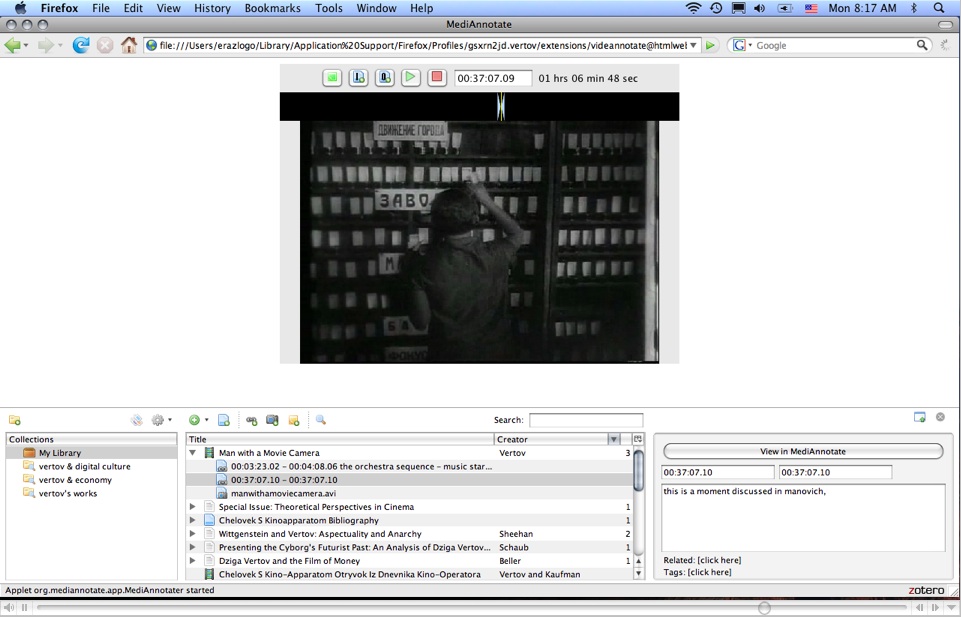
Zotero aims to be a digital research platform, and an extensible one at that. That’s why it’s gratifying and exciting to see the brilliant and incredibly useful Vertov plugin for Zotero. Vertov allows Zotero users to cut video and audio files into clips, annotate the clips, and integrate their annotations with other research sources and notes stored in Zotero. It has terrific functionality and should be ideal for use in the classroom as well as by film scholars and other researchers.

Vertov Screenshot

Congrats and many thanks to Concordia University’s Digital History Lab, led by Elena Razlogova, for conceptualizing and executing this great plugin.

PC Magazine Best Free Software IssueAnd since it’s been a little while since I’ve done shameless cheerleading for Zotero, it’s humbling to get the recognition from PC Magazine that Zotero has, for the second year in a row, been declared one of the best free software applications.

Enhancing Historical Research With Text-Mining and Analysis Tools

Monday, February 4th, 2008

Open BookI’m delighted to announce that beginning this summer the Center for History and New Media will undertake a major two-year study of the potential of text-mining tools for historical (and by extension, humanities) scholarship. The project, entitled “Scholarship in the Age of Abundance: Enhancing Historical Research With Text-Mining and Analysis Tools,” has just received generous funding from the National Endowment for the Humanities.

In the last decade the library community and other providers of digital collections have created an incredibly rich digital archive of historical and cultural materials. Yet most scholars have not yet figured out ways to take full advantage of the digitized riches suddenly available on their computers. Indeed, the abundance of digital documents has actually exacerbated the problems of some researchers who now find themselves overwhelmed by the sheer quantity of available material. Meanwhile, some of the most profound insights lurking in these digital corpora remain locked up.

For some time computer scientists have been pursuing text mining as a solution to the problem of abundance, and there have even been a few attempts at bringing text-mining tools to the humanities (such as the MONK project). Yet there is not as much research as one might hope on what non-technically savvy scholars (especially historians) might actually want and use in their research, and how we might integrate sophisticated text analysis into the workflow of these scholars.

We will first conduct a survey of historians to examine closely their use of digital resources and prospect for particularly helpful uses of digital technology. We will then explore three main areas where text mining might help in the research process: locating documents of interest in the sea of texts online; extracting and synthesizing information from these texts; and analyzing large-scale patterns across these texts. A focus group of historians will be used to assess the efficacy of different methods of text mining and analysis in real-world research situations in order to offer recommendations, and even some tools, for the most promising approaches.

In addition to other forms of dissemination, I will of course provide project updates in this space.

[Image credit: Matt Wright]

ScholarPress: WordPress Plugins for Education

Thursday, November 15th, 2007

ScholarPress logoAs if CHNM Creative Lead Jeremy Boggs and web developer Dave Lester don’t have enough to do during the day building fantastic web applications like Omeka, they have somehow managed to create a couple of incredibly useful and highly polished WordPress plugins for academia, and have launched the ScholarPress site as a hub for CHNM work in this fertile area. (Another recent WordPress plugin that academics should take note of is the Institute for the Future of the Book’s CommentPress.)

ScholarPress’s inaugural plugins are Courseware and WPBook. Courseware (co-developed by New York Public Library’s Josh Greenberg), turns WordPress, normally a blogging platform, into a full-fledged course management system, including easy syllabus creation, assignments, bibliographies, and scheduling. (And yes, you can have a class blog too.) WPBook creates your very own Facebook application out of your WordPress blog, allowing it to be embedded in Facebook.

Want to bring your class right into Facebook, where your students spend most of their time online? Simply combine the two plugins and create a class Facebook app that your students can install. Brilliant.

The Strange Dynamics of Technology Adoption and Promotion in Academia

Monday, November 5th, 2007

Kudos to Bruce D’Arcus for writing the blog post I’ve been meaning to write for a while. Bruce notes with some amazement the resistance that free and open source projects like Zotero meet when they encounter the institutional buying patterns and tech evangelism that is all too common in academia. The problem here seems to be that the people doing the purchasing of software are not the end users (often the libraries at colleges and universities for reference managers like EndNote or Refworks and the IT departments for course management systems) nor do they have the proper incentives to choose free alternatives.

As Roy Rosenzweig and I noted in Digital History, the exorbitant yearly licensing fee for Blackboard or WebCT (loathed by every professor I know) could be exchanged for an additional assistant professor–or another librarian. But for some reason a certain portion of academic technology purchasers feel they need to buy something for each of these categories (reference managers, CMS), and then, because they have invested the time and money and long-term contracts on those somethings, they feel they need to exclusively promote those tools without listening to the evolving needs and desires of the people they serve. Nor do they have the incentive to try new technologies or tools.

Any suggestions on how to properly align these needs and incentives? Break out the technology spending in students’ bills (“What, my university is spending that much on Blackboard?”)?

NYPL Labs Blog

Monday, November 5th, 2007

NYPL Labs Logo

Center for History and New Media alum and incredibly innovative digital thinker Josh Greenberg is now the Director of Digital Strategy and Scholarship at the New York Public Library. One of his first actions was to set up the NYPL Labs to produce and test new tools, technologies, and interfaces. It’s great to see they now have a blog that will expose these experiments in action.

Understanding reCAPTCHA

Friday, August 17th, 2007

reCAPTCHAOne of the things I added to this blog when I moved from my own software to WordPress was the red and yellow box in the comments section, which defends this blog against comment spam by asking commenters to decipher a couple of words. Such challenge-response systems are called CAPTCHAs (a tortured and unmellifluous acroynm of “completely automated public Turing test to tell computers and humans apart”). What really caught my imagination about the CAPTCHA I’m using, called reCAPTCHA, is that it uses words from books scanned by the Internet Archive/Open Content Alliance. Thus at the same time commenters solve the word problems they are effectively serving as human OCR machines.

To date, about two million words have been deciphered using reCAPTCHA (see the article in Technology Review lauding reCAPTCHA’s mastermind, Luis von Ahn), which is a great start but by my calculation (100,000 words per average book) only the equivalent of about 20 books. Of course, it’s really much more than that because the words in reCAPTCHA are the hardest ones to decipher by machine and are sprinkled among thousands of books.

Indeed, that is the true genius of reCAPTCHA—it “tells computers and humans apart” by first using OCR software to find words computers can’t decipher, then feeds those words to humans, who can decipher the words (proving themselves human). Therefore a spammer running OCR software (as many of them do to decipher lesser CAPTCHAs), will have great difficulty cracking it. If you would like an in-depth lesson about how reCAPTCHA (and CAPTCHAs in general) works, take a listen to Steve Gibson’s podcast on the subject.

The brilliance of reCAPTCHA and its simultaneous assistance to the digital commons leads one to ponder: What other aspects of digitization, cataloging, and research could be aided by giving a large, distributed group of humans the bits that computers have great difficulty with?

And imagine the power of this system if all 60 million CAPTCHAs answered daily were reCAPTCHAs instead. Why not convert your blog or login system to reCAPTCHA today?

It’s About Russia

Tuesday, March 6th, 2007

One of my favorite Woody Allen quips from his tragically short period as a stand-up comic is the punch line to his hyperbolic story about taking a speed-reading course and then digesting all of War and Peace in twenty minutes. The audience begins to giggle at the silliness of reading Tolstoy’s massive tome in a brief sitting. Allen then kills them with his summary of the book: “It’s about Russia.” The joke came to mind recently as I read the self-congratulatory blog post by IBM’s Many Eyes visualization project, applauding their first month on the web. (And I’m feeling a little embarrassed by my post on the one-year anniversary of this blog.) The Many Eyes researchers point to successes such as this groundbreaking visualization of the New Testament:

News flash: Jesus is a big deal in the New Testament. Even exploring the “network” of figures who are “mentioned together” (ostensibly the point of this visualization) doesn’t provide the kind of insight that even a first-year student in theology could provide over coffee. I have been slow to appreciate the power of textual visualization—in large part because I’ve seen far too many visualizations like this one, that merely use computational methods to reveal the obvious in fancy ways.

I’ve been doing some research on visualizations of texts recently for my next book (on digital scholarship), and trying to get over this aversion to visualizations. But when I see visualizations like this one, the lesson is clear: Make sure your visualizations expose something new, hidden, non-obvious.

Because War and Peace isn’t about Russia.

NINES Officially Launches

Tuesday, February 20th, 2007

As someone keenly interested in the possibilities of digital scholarship as well as nineteenth-century British and American intellectual history, I’m delighted to hear of the official launch of NINES (Networked Infrastructure for Nineteenth-century Electronic Scholarship), which allows researchers to search, organize, and annotate over 60,000 texts and images. A screencast of how to use Collex, their powerful web application, would be helpful for new users.

Zotero Needs Your Help, Part II

Wednesday, October 18th, 2006

In my prior post on this topic, I mentioned the (paid) positions now available at the Center for History and New Media to work on and promote Zotero. (By the way, there’s still time to contact us if you’re interested; we just started reviewing applications, but hurry.) But Zotero is moving ahead on so many fronts that its success depends not only on those working on it full time, but also those who appreciate the software and want to help out in other ways. Here are some (unpaid, but feel-good) ways you can get involved.

If you are a librarian, instructional technologist, or anyone else on a campus or at an institution that uses citation software like EndNote or RefWorks, please consider becoming an informal campus representative for Zotero. As part of our effort to provide a free competitor to these other software packages, we need to spread the word, have people give short introductions to Zotero, and generally serve as local “evangelists.” Already, two dozen librarians who have tried Zotero and think it could be a great solution for students, staff, and faculty on their campuses have volunteered to help out in this role. If you’re interested in joining them, please contact campus-reps@zotero.org.

We are currently in the process of writing up instructions (and possibly creating some additional software) to make creating Zotero translators and citation style formatters easier. Translators are small bits of code that enable Zotero to recognize citation information on a web page; we have translators for specific sites (like Amazon.com) as well as broader ones that recognize certain common standards (like MARC records or embedded microformats). Style formatters take items in your Zotero library and reformat them into specific disciplinary or journal standards (e.g., APA, MLA, etc.). Right now creating translators takes a fair amount of technical knowledge (using things like XPath and JavaScript), so if you’re feeling plucky and have some software skills, email translators@zotero.org to get started on a translator for a specific collection or resource (or you can wait until we have better tools for creating translators). If you have some familiarity with XML and citation formatting, please contact styles@zotero.org if you’re interested in contributing a style formatter. We figure that if EndNote can get their users to contribute hundreds of style formatters for free, we should be able to do the same for translators and styles in the coming year.

One of our slogans for Zotero is “Citation management is only the beginning.” That will become increasingly obvious over the coming months as third-party developers (and the Zotero team) begin writing what we’re calling utilities, or little widgets that use Zotero’s location in the web browser to send and receive information across the web. Want to pull out all of the place names in a document and map them on Google Maps? Want to send del.icio.us a notice every time you tag something in Zotero? Want to send text from a Zotero item to an online translation service? All of this functionality will be relatively trivial in the near future. If you’re familiar with some of the browser technologies we use and that are common with Web 2.0 mashups and APIs and would like to write a Zotero utility, please contact utilities@zotero.org.

More generally, if you are a software developer and either would like to help with development or would like to receive news about the technical side of the Zotero project, please contact dev@zotero.org.

With Firefox 2.0 apparently going out of beta into full release next Thursday (October 26, 2006), it’s a great time to start talking up the powerful combination of Firefox 2.0 and Zotero (thanks, Lifehacker and the Examiner!).